Create Everyday SVG for Cricut: A Designer’s Guide to Avoiding Common Pitfalls
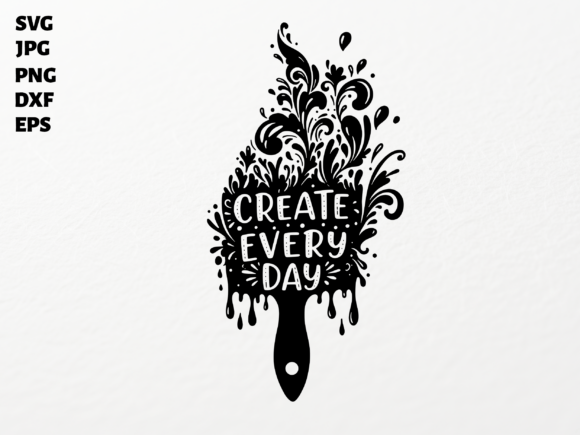
Whether you're a seasoned crafter or just starting out with your Cricut machine, the Create Everyday SVG for Cricut design offers a beautiful way to infuse creativity into your projects. This elegant design combines an inspiring quote with a stylized paintbrush and intricate floral elements, making it ideal for everything from t-shirts and mugs to social media graphics and planner stickers. However, many users overlook key details when working with SVG files, which can lead to frustration, wasted time, or disappointing results.
Why This Design Stands Out
The Create Everyday SVG is more than just a pretty graphic—it's a versatile digital asset that comes with multiple file formats, including SVG for Cricut and Silhouette Designer Edition, PNG with transparent background, DXF for Silhouette Basic Edition, EPS for Adobe Illustrator, and high-resolution JPG. This variety ensures compatibility across different platforms and cutting machines, making it a valuable tool for crafters, small business owners, and digital designers alike.
Common Mistakes to Avoid with Create Everyday SVG for Cricut
While SVG files are powerful tools, they can be tricky to use correctly, especially for beginners. Here are some of the most common issues users face and how to avoid them:
1. Assuming All SVG Files Are Created Equal
Not all SVG files are optimized for cutting machines. Some may have hidden layers, complex groupings, or incorrect stroke widths that can confuse your Cricut software. The Create Everyday SVG for Cricut is specifically designed for ease of use, but it’s still important to inspect the file before cutting.
- What to do: Open the file in your design software and check for overlapping elements or unnecessary groupings.
- Better approach: Ungroup elements if needed, adjust line thickness for cutting accuracy, and ensure all text is converted to paths if you're using a program like Inkscape or Illustrator.
2. Ignoring File Resolution for Print Projects
If you're planning to use the design for print (like on mugs, stickers, or invitations), relying solely on the SVG file might not be enough. SVGs are vector-based and scalable, but some printers or platforms require high-quality raster images like PNG or JPG.
- What to do: Use the included 300 DPI PNG or high-resolution JPG when preparing for print or web use.
- Better approach: Always double-check the resolution and format requirements of your printing service or platform before submitting files.
3. Misusing File Types for Different Software
Each file type included in the package serves a specific purpose. For example, DXF files are best for Silhouette Basic Edition users, while EPS is ideal for Adobe Illustrator. Using the wrong file type can lead to formatting issues or incomplete designs.
- What to do: Match the file format to your software. If you're unsure, start with the SVG for Cricut—it's the most universally compatible.
- Better approach: Keep all file types organized in a folder so you can easily access the right one for each project.
4. Overlooking Licensing and Usage Rights
Even if you purchase a design, that doesn’t always mean you can use it however you like. Some digital assets come with personal-use-only licenses, while others allow for commercial use. It’s crucial to understand the terms before selling items made with the design.
- What to do: Always read the license agreement included with your purchase.
- Better approach: Choose designs that clearly state commercial use is permitted if you're planning to sell your creations.
5. Skipping the Test Cut
It’s tempting to jump straight into cutting your final material, but skipping a test cut on scrap paper can lead to costly mistakes. Especially with intricate designs like the Create Everyday SVG, small alignment or size issues can be hard to correct after the fact.
- What to do: Always run a test cut on inexpensive material before cutting your final project.
- Better approach: Use the “Mirror” function if you're applying the design to heat-transfer vinyl or stickers to ensure proper orientation.
Choosing the Right Design for Your Project
Before downloading or purchasing any SVG, including the Create Everyday SVG for Cricut, take a moment to consider the scope and purpose of your project. Ask yourself:
- Will this design be used for personal or commercial purposes?
- Do I have the right software and machine to use this file type effectively?
- Is the design complex enough for my needs, or will it be too difficult to cut?
These questions can help you avoid compatibility issues and ensure you're getting the most value from your purchase.
How to Get the Most Out of Your Create Everyday SVG for Cricut
Once you've avoided the common pitfalls, you can start enjoying the full potential of this design. Here are a few tips to elevate your projects:
- Layer colors creatively: Use the design in multiple colors to create depth and visual interest on t-shirts or wall art.
- Resize wisely: Maintain the design's clarity by avoiding extreme resizing—especially with intricate floral details.
- Pair with coordinating elements: Combine the Create Everyday SVG with other floral or brushstroke graphics for a cohesive look in scrapbooking or digital layouts.
Final Thoughts
The Create Everyday SVG for Cricut is a beautifully crafted design that offers flexibility and inspiration for a wide range of creative projects. However, success comes from understanding how to work with digital files effectively. By avoiding common mistakes—like ignoring file types, skipping test cuts, or misunderstanding licensing—you can ensure your projects turn out as beautifully as you envisioned. Whether you're making a custom tumbler, a motivational wall decal, or a digital graphic for your blog, this design is a worthwhile addition to your creative toolkit—provided you use it wisely.