Provia — Proposal Deck Google Slide: Present Ideas with Impact
Streamline Your Pitch with a Thoughtfully Designed Presentation Tool
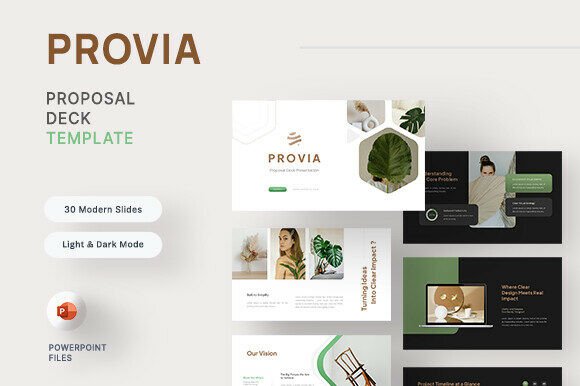
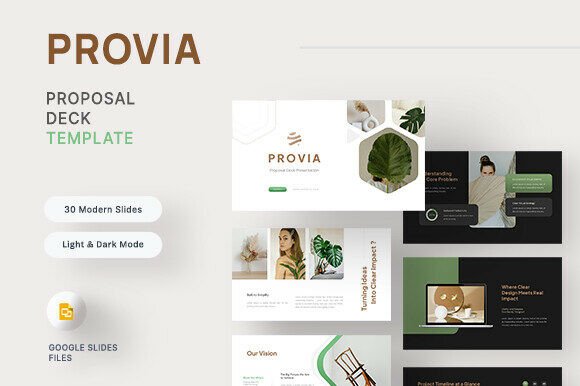
Whether you're pitching a business strategy, outlining a creative project, or proposing a new initiative, how you present your ideas matters. Provia — Proposal Deck Google Slide is a presentation template designed to help you communicate clearly, confidently, and with purpose. With 30 carefully crafted slides, it supports a natural narrative flow that guides your audience from concept to execution—without losing clarity or impact.
What Makes Provia Stand Out?
Unlike generic slide decks that require extensive customization, Provia is built with intention. Each slide is part of a cohesive structure that helps you tell your story logically and persuasively. Whether you're a startup founder, a marketing professional, or an educator preparing a proposal, this template gives you a strong foundation to build upon.
- 30 Total Slides designed for narrative flow and strategic pacing
- Light and Dark Mode options for flexible presentation settings
- Free Web Fonts for clean, modern typography
- Fully Editable Elements to tailor visuals, text, and layout
- Preset Master Slides ensure consistency across your presentation
- Picture Placeholders to insert your own visuals easily
Real-World Applications Across Industries
Provia isn’t limited to one type of presentation or industry. Its structure is versatile enough to suit a wide range of use cases, from business proposals to academic presentations to creative project outlines.
Business & Entrepreneurship
For entrepreneurs and business professionals, the ability to present a compelling case can mean the difference between approval and rejection. Provia’s Opening, The Proposal, and Closing Call to Action slides help frame your message effectively. The Budget Timeline and Implementation Plan slides allow you to break down complex strategies into digestible visuals that stakeholders can easily understand.
Education & Training
Educators and trainers can use Provia to outline course proposals, professional development plans, or research presentations. The Background Insights and Impact Validation slides are especially useful for grounding proposals in data and demonstrating expected outcomes.
Creative & Digital Projects
Designers, content creators, and digital marketers often need to pitch visual or strategic ideas. Provia’s clean, modern layout supports visual storytelling while keeping the focus on your message. Picture placeholders make it easy to insert mockups, wireframes, or concept art without disrupting the flow of your presentation.
Why Usability and Design Matter in Presentations
A well-designed presentation doesn’t just look better—it communicates better. Poorly structured slides can confuse audiences, dilute your message, and reduce engagement. Provia addresses these issues by offering a presentation framework that prioritizes clarity, visual balance, and ease of use.
Because all elements are editable, you can adapt the template to match your brand’s colors, fonts, and tone. Whether you're presenting in a boardroom or sharing a digital pitch deck online, the result feels professional and polished—without requiring advanced design skills.
Benefits You’ll Notice Right Away
- Efficiency – Save time with a ready-to-use structure that eliminates guesswork
- Clarity – Guide your audience through your ideas with a logical, narrative-driven flow
- Engagement – Clean visuals and smart layout keep your audience focused on your message
- Consistency – Master slides ensure every slide maintains a unified look and feel
- Flexibility – Light and dark modes suit different environments and preferences
How to Make the Most of Provia
To get the best results from Provia — Proposal Deck Google Slide, it’s important to understand how each section contributes to your overall message. Here are a few practical tips for using the template effectively:
- Start with a strong opening – Use the opening slide to set the tone and clearly state your purpose
- Use data to support insights – The Background Insights section is a great place to show research, trends, or market analysis
- Explain the value clearly – In The Proposal slides, focus on how your idea solves a problem or creates value
- Be specific about implementation – The Implementation Plan should outline steps, responsibilities, and timelines
- Close with a clear call to action – End with a persuasive closing slide that tells your audience exactly what to do next
Customization Tips for Better Brand Alignment
While Provia comes with a neutral, modern design, you can customize it to reflect your brand identity. Replace the default colors with your brand palette, use your company logo in headers or footers, and update the fonts if needed (as long as they're available in Google Slides). These small changes can make your presentation feel more authentic and professional.
What to Consider Before Using Provia
While Provia is a powerful tool, it’s best suited for users who want a structured, easy-to-edit presentation format. If you're looking for something highly stylized or animated, this may not be the right choice. However, if you value clarity, efficiency, and a clean aesthetic, Provia is an excellent fit.
Also, keep in mind that the images used in the demo are for preview purposes only. You’ll need to insert your own visuals to personalize the slides. Fortunately, the placeholder system makes this process straightforward and intuitive.
Final Thoughts: A Presentation Template Designed for Real People
Provia — Proposal Deck Google Slide stands out because it’s built with real-world use in mind. It’s not just a collection of slides—it’s a tool for storytelling, persuasion, and clarity. Whether you're presenting to a client, a team, or a classroom, this template helps you deliver your message with confidence and calm.
If you're tired of starting presentations from scratch or struggling to maintain a consistent flow, give Provia a try. It might just become your go-to resource for every proposal, pitch, or presentation you create.