Syntek – AI Innovation PowerPoint
Modern Presentation Design for Tech-Focused Audiences
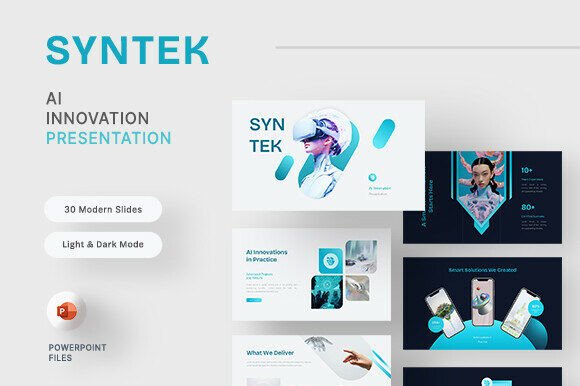
Syntek is a sleek, futuristic PowerPoint template built for professionals who need to communicate AI concepts, product strategies, and research findings with visual clarity. With its clean gradients, modern layouts, and dual light and dark mode options, Syntek supports a wide range of tech-related storytelling. Whether you're pitching an AI startup, presenting SaaS features, or sharing insights from a research lab, this template gives you the visual tools to engage your audience effectively.
Why Syntek Stands Out
The strength of Syntek lies in its balance between aesthetics and functionality. Each of the 30 fully editable slides is designed with intention, ensuring that your message remains clear while your visuals remain compelling. Built using free web fonts and based on master slides for consistency, Syntek makes it easy to maintain a professional look across your entire presentation.
- Light and Dark Mode – Switch between modes to match your environment or brand style.
- Fully Editable Elements – Customize colors, shapes, and layouts to align with your branding.
- Picture Placeholders – Easily insert your own visuals without disrupting slide design.
- Modern Visuals – Gradients, clean lines, and minimalistic design support a futuristic aesthetic.
Creative Applications for Syntek
While Syntek is ideal for AI and tech presentations, its flexible design opens the door to a variety of creative uses. Here are a few ways to apply this template across different projects and industries:
- AI Startup Pitch Decks – Use the clean structure and modern visuals to showcase your product roadmap, market opportunity, and team expertise.
- Product Feature Demos – The mockup device slides help you visually present digital products in a realistic context.
- Research Lab Reports – Leverage the infographic and chart slides to break down complex data and research findings.
- Educational Presentations – Whether you're teaching AI fundamentals or presenting a case study, Syntek’s layout supports structured, engaging delivery.
- Internal Strategy Meetings – Use the portfolio and team slides to align your team around new initiatives or quarterly goals.
Designing for Different Audiences
Syntek's adaptability makes it a strong choice for diverse audiences. Here's how different professionals can tailor the template for their needs:
- Marketers – Use the service and portfolio slides to present AI-driven campaigns, audience insights, or product positioning.
- Entrepreneurs – The welcome and ending slides are ideal for framing your pitch with a strong narrative arc.
- Designers – Customize the master slides to match your brand identity while maintaining the template’s clean structure.
- Freelancers – Showcase your AI-related projects using the portfolio and mockup device slides to impress potential clients.
- Educators – Use the infographic and chart slides to explain AI concepts in an accessible, visually engaging way.
Maximizing Clarity and Impact
Even with a well-designed template like Syntek, the effectiveness of your presentation depends on how you use it. Here are some tips to ensure your slides communicate clearly and professionally:
- Keep Text Concise – Use bullet points and short phrases to guide your audience without overwhelming them.
- Use Visual Hierarchy – Make sure titles, subheadings, and body text are clearly differentiated in size and weight.
- Align with Branding – Customize colors, fonts, and imagery to match your brand guidelines and maintain consistency.
- Test Across Devices – Ensure your slides are readable on both large screens and mobile devices.
- Practice Your Delivery – A great template supports your message, but your delivery is what makes it memorable.
Real-World Examples and Ideas
Let’s look at a few real-world scenarios where Syntek can make a difference:
- Startup Pitch – A SaaS founder uses the team and service slides to explain their AI-powered analytics tool, followed by a device mockup to show the interface in action.
- Research Presentation – A university researcher uses the chart and infographic slides to explain machine learning trends and data patterns in a digestible format.
- Product Launch – A tech company uses the welcome and ending slides to bookend a presentation on their new AI chatbot, supported by portfolio slides showing case studies.
- Team Onboarding – An internal team lead uses the about us and support slides to introduce new hires to the company’s AI tools and support resources.
Customizing Syntek for Your Style
One of the best features of Syntek is that it’s not locked into a single aesthetic. Because all elements are fully editable, you can personalize the template to suit your brand, tone, or creative direction. Here are a few ways to make it your own:
- Swap Color Schemes – While Syntek uses clean gradients, you can adjust the colors to match your brand palette.
- Reorganize Slide Order – Rearrange the included sections to create a unique flow that fits your narrative.
- Add Custom Icons or Illustrations – Use the placeholder areas to insert your own visuals that reinforce your message.
- Combine with Other Templates – Mix and match slides from other decks to create a hybrid presentation that’s uniquely tailored.
Getting the Most from the Template
When working with Syntek, it’s important to understand the tools you have available. The included documentation provides clear instructions on how to edit slides, change fonts, and insert images. Here are a few additional tips to streamline your workflow:
- Use Master Slides for Consistency – Modify the master slides to update fonts, colors, and layouts globally.
- Replace Placeholders with Real Images – While the template includes picture placeholders, adding your own visuals will make the presentation more authentic.
- Save Custom Versions – Once you’ve customized the template for a specific use, save it as a new file so you can reuse it later.
- Test in Different Lighting – Preview your slides in both light and dark mode to see which version works best for your environment.
Final Thoughts
Syntek – AI Innovation PowerPoint is more than just a presentation template. It’s a flexible design system that empowers creators, marketers, educators, and entrepreneurs to communicate complex ideas with clarity and style. Whether you're presenting to investors, clients, or your own team, Syntek gives you the tools to make your message stand out. By understanding how to adapt and customize the template, you can create presentations that are not only visually appealing but also strategically effective.